 Revcodex
Ask anyone who has run a data project why it stalled, and you’ll rarely hear “the software didn’t work.” You’ll hear “we started in the wrong place.” That’s especially true for a Salesforce Data Cloud implementation. The platform is capable, but it’s unforgiving about order. Skip the groundwork and your segments, dashboards and automations all rest on profiles nobody trusts.
This post walks through the sequence we’d follow, why each step sits where it does, and where teams usually get hurt. If you’re still deciding whether the platform suits you, read our overview, Salesforce Data Cloud: What It Is and How It Works, first. To have Revcodex pressure-test your plan, our Salesforce consulting team can review it against your actual systems.
Key Takeaways
- The reliable order is: define outcomes, decide where it lives, connect sources, map, resolve identities, validate, segment, activate, govern.
- Mapping and identity resolution are the critical path. Everything after them inherits their mistakes.
- Start with one or two use cases and one activation path, then expand.
- Treat mappings and identity rules like production code, with review and controlled deployment.
- Timelines vary widely with data quality and scope, so plan in phases with checkpoints instead of one date.
Before You Start a Salesforce Data Cloud Implementation
Most of the useful work happens before anyone opens Setup. Answer these questions on paper first.
- What decision will this improve? “Better personalization” is too vague. “Stop sending renewal offers to customers with an open escalation” is a use case.
- How will you know it worked? Pick two or three measures, such as the share of records that match correctly, the time it takes to build an audience, or the lift on one campaign.
- Who owns it? Someone needs to own security and setup, someone the data model and mappings, and someone the business outcome. These are often three different people.
A short review of your source systems at this stage saves weeks later. If you’d like an outside pair of eyes, our Salesforce audit is designed for exactly this moment.
The Implementation Sequence, Step by Step
Step 1: Decide where Data Cloud lives
Provisioning is an architecture decision, not a checkbox. You’ll need to choose which Salesforce org hosts it and how data will be shared if you run more than one org. Salesforce’s architects publish guidance on this, including options for sharing between orgs. Changing your mind after several teams are connected is painful, so settle it early, with security and compliance at the table.
Step 2: Choose how data gets in
You have two broad options. You can ingest data, meaning copy it into Data Cloud, or you can connect to it where it already sits through zero-copy access to a warehouse or lake you already run, whether that’s Snowflake, BigQuery, Databricks or Redshift. Many enterprises land on a hybrid approach.
- Ingest data that must be governed tightly and reused across many processes.
- Access in place data that’s very large, rarely used, or already well managed in your warehouse.
Step 3: Set permissions and connect sources
Assign the right permission sets to the people doing setup, then connect each source and create data streams for the entities you planned to bring in. Connect Salesforce orgs first if you have them, because they’re usually the simplest and give you early test data. Deploy each stream and confirm rows are actually arriving before you move on.
Step 4: Map fields to the data model
Of all ten steps, this one decides how the rest go. Each source’s raw fields get mapped to the shared data model, so an email address from your store and one from your service system land in the same place. The trap is that mapping feels like clerical work, so it gets rushed. Later steps depend on it, including identity resolution and segments. Salesforce’s training content on unified profiles calls out mapping to the Individual object as a requirement for using identity resolution (Trailhead).
Step 5: Configure identity resolution
Now decide how records become people. You’ll write two kinds of rules. Match rules define when two records belong together, such as an exact email match, or a fuzzy name plus address. Reconciliation rules define which value wins when sources disagree.
Start conservative. It’s easier to loosen a rule that under-matches than to untangle a profile that wrongly merged two customers.
Step 6: Validate before you build on it
Use the data explorer to check that ingested data looks right, and the profile explorer to inspect actual unified profiles. Look for record counts that match the source, relationships that connect properly, and profiles that are neither over-merged nor under-merged. Test the awkward cases on purpose: shared family emails, people with two spellings of a name, companies with several contacts.
Step 7: Build your first segments and insights
Segments draw on attributes that come from your mapped data and the relationships you set up, so they’re only as good as the earlier steps. Build for one or two priority use cases, not twenty. Then add calculated insights, the metrics such as recency or lifetime value that make segments meaningful.
Step 8: Activate one path first
Activation is where value shows up: sending an audience to a campaign, triggering a service alert, or pushing an event to another system through data actions or APIs. Pick one path tied to a measurable outcome, confirm the field values and consent flags are right in the destination, and only then widen it.
Step 9: Put governance in place
Decide who can create streams, edit mappings, change identity rules and publish segments. Confirm that consent and data-handling requirements match your policies before any audience leaves the platform. Salesforce maintains compliance documentation you can review with your legal and security teams.
Step 10: Plan how changes are deployed
Mappings and identity rules touch everything downstream, so a casual edit in production can break live segments. Salesforce documents ways to move Data Cloud changes between orgs, including deployment connections and change sets. Build a release routine early: test in a sandbox, review, then deploy.
Where Each Phase Usually Goes Wrong
This table is our own summary of patterns we see in data projects generally, meant as a planning aid rather than a statistical finding.
| Phase | Typical failure | Guardrail |
|---|---|---|
| Planning | Vague goals, no owner | Two or three written use cases with measures |
| Connecting | Ingesting everything “just in case” | Bring in only what the first use cases need |
| Mapping | Rushed, undocumented field choices | A mapping sheet reviewed by the model owner |
| Identity resolution | Over-merged or duplicated profiles | Conservative rules and a sampled profile review |
| Segments | Built before the model settles, then rebuilt | Freeze mappings before segmenting |
| Activation | Sending data without checking consent | One path first, consent flags verified |
A Realistic Way to Phase the Work
We won’t quote a fixed number of weeks, because scope and data quality change the answer more than anything else. What we do recommend is phasing by proof, not by calendar.
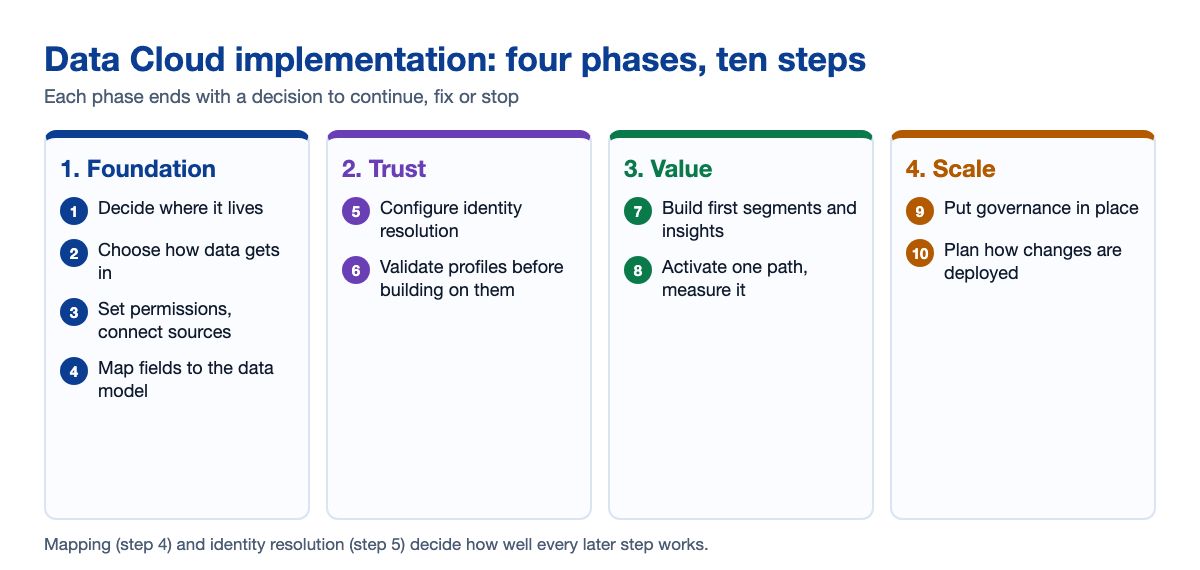
- Phase 1, foundation: architecture decision, first sources connected, mapping complete for those sources.
- Phase 2, trust: identity rules built and tested, profiles reviewed by people who know the customers.
- Phase 3, value: a first segment, one activation path, and a measured result.
- Phase 4, scale: more sources, more use cases, formal governance and release routines.
Each phase ends with a decision: continue, fix, or stop. That keeps a project honest. If integrations between your systems are part of the challenge, our guide to Salesforce integration services explains where the two efforts overlap.
Questions to Ask Any Implementation Partner
- How will you test identity rules against our real records, not sample data?
- Which sources do you suggest we ingest, and which would you access in place?
- Who on your team has done this for a business like ours, and what happened after go-live?
- How will changes to mappings and rules be reviewed and deployed?
- What will you hand over so our team can run it without you?
Good answers are specific. Be cautious of anyone who promises a date before they’ve seen your data. Salesforce’s own learning module on the stages of Data Cloud is a useful way to check that a partner’s plan follows the same logic.
How Revcodex Can Help
We help Salesforce teams pick a first use case worth proving, review mappings and identity rules before they harden, and plan activation so results reach sales, service and marketing. If you want a practical review of your plan, talk to Revcodex and share a brief outline of your systems and goals.
FAQs
What are the main steps in a Salesforce Data Cloud implementation?
Define outcomes, decide where Data Cloud lives, choose how data gets in, connect sources, map fields, configure identity resolution, validate profiles, build segments, activate one path, then add governance and deployment routines. The order matters because later steps depend on earlier ones.
How long does a Salesforce Data Cloud implementation take?
It depends on how many sources you connect, how clean your data is and how many use cases you start with. A focused first release is much quicker than a company-wide rollout. Plan in phases with checkpoints instead of committing to one date.
Why is identity resolution so important?
Identity resolution decides which records become one person. If matching is too loose, different customers merge. If it’s too strict, duplicates remain. Every segment and activation inherits those errors, so it deserves careful testing before you build on top of it.
Should we ingest all our data into Data Cloud?
Usually not. Ingest data that needs tight governance and wide reuse, and access large or rarely used data in place through zero-copy connections. Bringing everything in adds cost and complexity without helping your first use cases.
Who should own a Data Cloud project?
Ideally three roles: an admin who owns setup and security, a data model owner responsible for mappings and identity rules, and a business owner accountable for the outcome. One person can hold two roles in a small team, but nobody should hold none.
What should we do first?
Write down two or three use cases with measures, list your source systems and their owners, and check data quality. That short exercise shapes every later decision and often shows whether you’re ready or should fix data problems first.
Conclusion
A Salesforce Data Cloud implementation succeeds or fails on discipline. Decide the outcomes, connect only what you need, take mapping and identity resolution seriously, and prove value with one activation before scaling. It’s slower to start that way and much faster to finish.
Whether you run it in-house or with a partner, insist on evidence at each phase. Review real profiles, measure a real result, and change rules through a controlled process. Those habits matter more than any single feature.
If you’d like a second opinion on your plan, Revcodex is happy to review it with you and point out the risks worth fixing before you build.

