 Revcodex
Most companies don’t have a data shortage. They have a data scatter problem. A customer’s purchases sit in one system, their support tickets in another, their email clicks in a third, and none of those systems agree on who the customer is. Salesforce Data Cloud is Salesforce’s answer to that mess. It pulls records from many sources, matches them to the same person or account, and keeps one live profile that every team can use.
This guide explains what Salesforce Data Cloud is, how the pieces fit together, where it pays off, and where it doesn’t. It’s written for business and operations leaders who need to decide whether to invest, and for admins who need a mental model before they touch setup. If you’re weighing a project, our Salesforce consulting services team at Revcodex can help you scope it against your real data, not a demo dataset.
Key Takeaways
- Data Cloud connects data from Salesforce and non-Salesforce systems and resolves it into one unified profile per customer.
- The order of work matters: connect sources, map to the data model, resolve identities, then build segments and activate.
- Identity resolution quality decides whether the whole project works. Weak matching gives you confident-looking bad profiles.
- It isn’t the right tool for every business. If your customer data already lives in one clean system, you may not need it yet.
- Salesforce is also using the name Data 360 for the same product, so expect to see both names.
What Is Salesforce Data Cloud?
In short, it’s a data platform. It takes in information from your CRM and other systems, reshapes it into a common model, and produces unified customer profiles you can segment and act on. Earlier in its life it was known as Genie, and newer Salesforce material increasingly calls it Data 360. It’s the same product family, so don’t be thrown if a vendor or a Trailhead module uses a different label.
The important part is what it isn’t. It isn’t a replacement for Sales Cloud or Service Cloud, and it isn’t a generic data warehouse. Think of it as a layer that sits beside your Salesforce clouds and your other systems. Sales, service, marketing and commerce teams read from it and write results back to it.
The problem it solves
Salesforce’s own material on unified profiles points out that the average company runs a huge number of apps, roughly 1,061 by its count, and only about 29% of them are integrated (Salesforce). Treat those figures as Salesforce’s claim rather than an independent survey. The direction is still familiar to anyone who has tried to build a customer report from four exports and a spreadsheet.
Without a shared profile, the symptoms are predictable. A customer who returned an item last week gets a discount email for the same item. A support agent asks for details the sales rep already collected. Marketing counts the same person three times because their email address is spelled differently in two systems.
How Salesforce Data Cloud Works
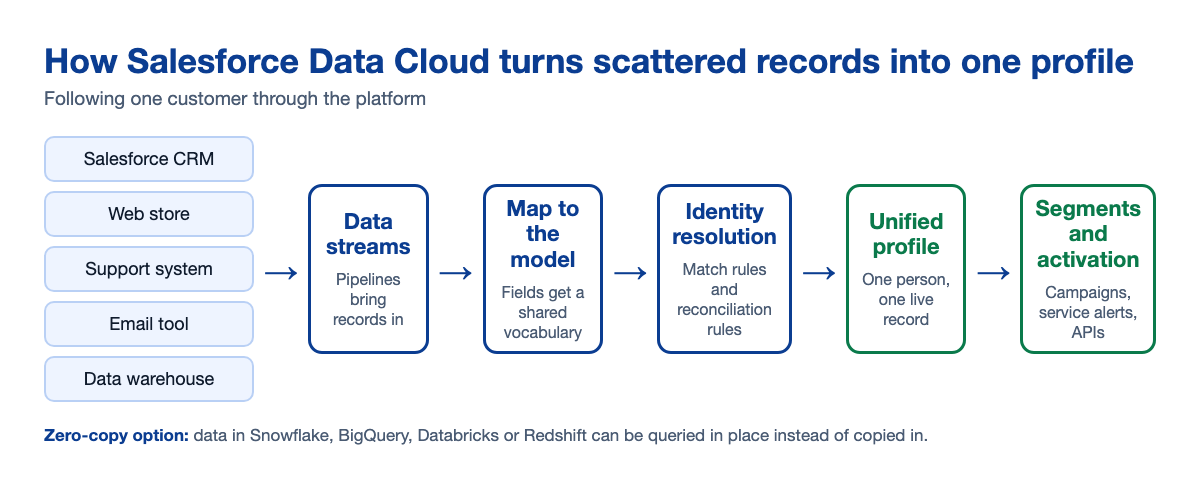
You can understand the whole platform by following one record through it. Say a customer, Priya, buys through your web store, opens a support case, and signs up for a newsletter using a different email.
Step 1: Data streams bring records in
A data stream is a pipeline from one source into Data Cloud. Sources can be the Sales, Service, Marketing or Commerce clouds, or outside systems, including files sitting in Amazon S3 or Google Cloud Storage buckets. Each stream carries a specific set of entities, for example contact records from Sales Cloud or email engagement from Marketing Cloud.
Step 2: Data lake objects hold the raw material
Incoming data lands in data lake objects, which are the working area where you inspect it and prepare it. This is also where teams clean up field formats and add derived fields before anything gets mapped.
Step 3: Mapping to the data model
Next, you map those raw fields onto data model objects. These give every source a shared vocabulary, so “email” from the store and “email” from the newsletter tool point at the same concept. Mapping is unglamorous and it’s where many projects quietly go wrong. Salesforce’s guidance, as implementation partners summarize it, treats proper mapping as a prerequisite for identity resolution and for segmentation to behave.
Step 4: Identity resolution creates the unified profile
This is the heart of the product. Identity resolution uses rulesets to decide which records describe the same person. Match rules say how records link, for instance by exact email or by a combination of name and address. Reconciliation rules decide which value wins when the sources disagree, such as which phone number appears on the final profile. The result for Priya: one unified profile combining her purchase, her case and her newsletter signup.
Step 5: Segments, insights and activation
With profiles in place, you can build segments (for example, customers with an open case and a purchase in the last 30 days), calculate metrics such as lifetime value, and send the results where teams work. That can mean audiences for campaigns, signals for service teams, or events pushed to other systems through data actions and APIs.
Zero-copy access to existing data
Not every table needs to be copied in. Data Cloud can connect to data that stays in platforms such as Snowflake, Google BigQuery, Databricks and Amazon Redshift, and query it in place. Many teams end up with a mix: ingest the data that must be governed and reused everywhere, and leave large or rarely used data where it already lives.
Salesforce Data Cloud Benefits for Business Teams
The benefits are easiest to judge by team rather than by feature.
- Marketing: segments built on complete behavior and purchase history, and fewer wasted sends to people who already bought.
- Sales: reps see service issues and product usage before a renewal call, not after it goes badly.
- Service: agents see the customer’s recent orders and messages without switching tools.
- Leadership: one definition of “customer” across reports, which ends a surprising number of meeting arguments.
Salesforce cites the convenience chain Casey’s as an example, reporting that 16% more customers bought after it started tailoring offers with unified data (Salesforce). It’s a vendor case study, so read it as an illustration of the idea, not a benchmark you should expect to match.
Salesforce Data Cloud vs Other Approaches
Data Cloud competes with a few other ways of solving the same problem. This comparison is our own summary of the trade-offs, based on how these options typically get used.
| Approach | Best for | Watch out for |
|---|---|---|
| CRM only | Small teams whose customer data lives mostly in Salesforce | Web, product and billing data stay disconnected |
| Point-to-point integrations | Two or three systems with simple sync needs | Each new system multiplies maintenance work |
| Data warehouse plus BI | Analytics and reporting teams with strong data engineering | Insights often don’t flow back into daily sales and service work |
| Salesforce Data Cloud | Many sources, real-time profiles, activation inside Salesforce | Needs disciplined mapping and identity rules, plus ongoing governance |
If your integrations are the real bottleneck, start there. Our guide to Salesforce integration services covers when connecting systems is enough and when you need a shared profile on top.
When Salesforce Data Cloud Is Not the Right Move
We’d rather tell you this now than after a project stalls. Hold off if any of these describe you:
- Your customer data is already clean, in one system, and your teams are happy with it.
- You can’t yet name two or three specific decisions or campaigns you’d improve with unified data.
- Nobody owns data quality. Unifying messy data gives you one messy profile instead of five.
- Consent and privacy rules are unclear. You need those settled before you activate anything.
A short data audit often answers these questions in a week or two. It’s cheaper than discovering them mid-implementation.
Common Mistakes With Data Cloud Projects
Starting with activation instead of foundations
Teams get excited about segments and skip mapping. Then the segments break every time the model changes. Do mapping and identity resolution first, even though nobody demos them.
Over-merging or under-merging profiles
Loose match rules combine different people into one profile. Strict ones leave duplicates. Both are silent failures. Inspect real profiles in the profile explorer before you trust the results, and sample the edge cases like shared family emails.
Ingesting everything
Copying every table in “just in case” adds cost and complexity. Pick the data your first use cases need, and federate the rest.
Treating rules as throwaway settings
Identity rules and mappings affect everything downstream. Change them with the same care you’d give production code: review, test, then deploy.
How Data Cloud Connects to Agentforce and Your Other Clouds
Data Cloud plugs into the Sales, Service, Marketing and Commerce clouds, which is why it’s often the first piece companies add when they want more personalization across teams. Salesforce also positions it as the data foundation for its AI agents, since an agent is only as useful as the customer context it can see. If AI-assisted service or sales is on your roadmap, our overview of Agentforce services shows how that side fits, and our post on Agentforce for sales teams gives a practical example.
A Readiness Checklist Before You Start
- Two or three concrete use cases, each with a measurable outcome.
- A list of source systems, who owns each, and how you can access them.
- A rough view of data quality: duplicates, missing emails, inconsistent formats.
- A decision on which data you’ll ingest and which you’ll access in place.
- A named owner for mapping, identity rules and governance.
- Clear consent and privacy requirements for the channels you plan to use.
How Revcodex Can Help
We work with Salesforce teams on the unglamorous parts that decide whether a data project succeeds: choosing the first use case, testing the identity strategy against your real records, and planning how results flow back into sales, service and marketing. If you’d like an outside view before you commit budget, start with our Salesforce audit or contact us with a short description of your systems.
FAQs
What is Salesforce Data Cloud used for?
It unifies customer data from Salesforce and other systems into one profile per person or account. Teams then use those profiles for segmentation, personalization, analytics and triggering actions, such as campaign audiences or service alerts, across sales, service and marketing.
Is Salesforce Data Cloud the same as Data 360?
Yes, for practical purposes. Salesforce has been introducing the name Data 360 for the product formerly marketed as Data Cloud, and before that Genie. Documentation and partners use the names interchangeably, so check the current label in your org and in Salesforce’s release notes.
Do I need Salesforce CRM to use Data Cloud?
Not strictly. It can ingest data from non-Salesforce sources, but most of the value shows up when it feeds Salesforce clouds where your teams already work. Confirm licensing and edition requirements with Salesforce before you plan a project.
What is identity resolution in Data Cloud?
Identity resolution is the process that matches records from different sources to the same person or account. Match rules decide which records link, and reconciliation rules choose which field values appear on the unified profile when sources conflict.
How long does a Data Cloud implementation take?
It depends on the number of sources, the quality of your data and how many use cases you start with. A narrow first release with a few sources can be much faster than an enterprise-wide rollout. Ask any partner for a phased plan tied to specific outcomes, not a single big-bang date.
Can Data Cloud work with data that lives in Snowflake or BigQuery?
Yes. Zero-copy connections let Data Cloud read data from platforms like Snowflake, Google BigQuery, Databricks and Amazon Redshift without copying it in. That’s useful for large or rarely used datasets you don’t want to duplicate.
Conclusion
Salesforce Data Cloud is worth serious attention when your customer data is spread across systems that don’t agree with each other, and when you have specific decisions that would improve with a shared view. It rewards discipline. Connect the right sources, map them carefully, invest in identity resolution, and prove value with one activation before you scale.
It’s just as reasonable to conclude you aren’t ready. Cleaning up a couple of integrations or fixing data ownership first can save a lot of money. Either way, decide based on your own data and your own use cases.
If you want a second opinion, Revcodex can review your systems and help you choose a sensible first step. Reading Salesforce’s own Trailhead module on unified profiles is also a good way to get the vocabulary straight before those conversations.

